Razer's New Mouse Adds AI Features but Pushes Key Controls Out of Reach
The Basilisk V4 Pro offers a longer battery and lighter frame, yet its new layout makes thumb buttons harder to use for many players.
By Elizabeth Morales ·
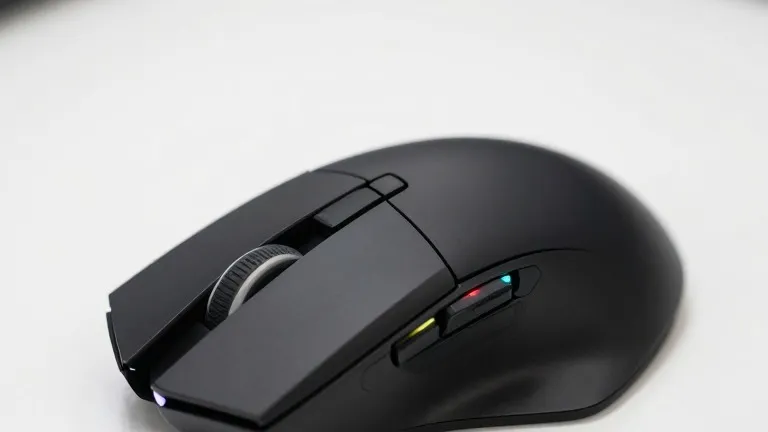
Razer has released the Basilisk V4 Pro, a refreshed gaming mouse that prioritizes new features over ergonomic comfort. The device adds a dedicated artificial intelligence button and extends battery life, but the physical placement of these controls creates friction for users with average hand sizes.
The central conflict lies in the mouse's new button layout. Razer added two buttons to bring the total count to twelve programmable inputs. One new button sits beside the left click and switches profiles, while the other is a third thumb button that opens Razer's AI prompt by default. Senior editor Sarah Jacobsson Purewal, who reviewed the device for Tom's Hardware, found both additions problematic.
The profile button is positioned at the front edge of the mouse, which measures 5.02 inches or 127.5mm long. For someone with medium-sized hands and long fingers, this location is too far to press comfortably. The AI button presents a more complex issue because it is the same size as the existing thumb buttons. Its addition pushes the original thumb buttons backward, leaving the first one, labeled MB4, difficult to reach without adjusting hand position.
Although Razer allows users to remap these buttons, the reviewer noted that all three thumb buttons felt slightly off in the new configuration. The review also questioned the necessity of a dedicated AI prompt button on every peripheral. Jacobsson Purewal described the V4 Pro as a strong all-rounder for players who want more functionality than a stripped-down shooter mouse but do not want a button-heavy design like the Naga V3 Pro.
The hardware specifications show improvements in weight and power. The black version of the mouse weighs 3.53 ounces, or 100 grams. This is almost half an ounce lighter than the previous Basilisk V3 Pro 35K, which weighed 3.95 ounces or 112 grams. The reviewer noted that while the device is still far from ultralight, it is easier to pick up and use for extended periods.
Battery life has increased from 150 hours on the previous model to 200 hours at a 1,000 Hz polling rate over 2.4GHz wireless. If the polling rate is increased to 8,000 Hz, the battery life drops to 54 hours. The mouse connects via 2.4GHz wireless, Bluetooth, or USB-C. It uses Razer's Focus Pro 50K optical sensor, which reaches 50,000 DPI and 930 IPS, and tracks on most surfaces, including glass at least 4mm thick.
The fourth-generation optical switches are rated for more than 100 million clicks. In testing, they produced no misclicks or double-clicks. The tilt wheel offers two tactile modes with 24 and 48 steps, as well as a free-spin mode. The free-spin setting proved too sensitive and prone to backscrolling, while the precision tactile mode received praise for its control.
The Basilisk V4 Pro is priced at $169.99 in both black and white colors. It launched alongside the Mouse Dock V2 Pro, which is sold separately for $69.99. The dock is a small wireless charging unit with an integrated 8,000 Hz receiver and eight RGB zones. The mouse box includes a USB-A dongle, an adapter, and a 6-foot braided cable, but it does not include one of Razer's flexible HyperFlex cables or any grip tape.
This is the first major update to the Basilisk line in two years. The previous update was the Basilisk V3 Pro 35K in October 2024, which paired the V3 Pro with a new sensor. The V4 Pro keeps the familiar right-handed, contoured shape and bright RGB lighting. The review positions the new mouse between the DeathAdder V4 Pro and the more button-laden Naga V3 Pro, noting that its slightly large size and price are drawbacks alongside the layout changes.
Source: Tom's Hardware